

COMMERCIAL CLIENTS
Review your exposure before you hedge it
Enter what your business buys or sells, see it by day, week and month, and size it in whole contracts against dated NYMEX contracts. Type your own price to see your cost if the market rises or falls, with and without the hedge.
Commercial hedging review workflow
For a business that buys or sells a commodity: how much is exposed and when, how many whole contracts would cover it, and what would a hedge do to the cost if the price moves?
- Open Hedging review in Commercial clients. On Exposure, enter the product, quantity, delivery dates, what is already fixed-price and any existing hedges, and see your exposure by day, week and month.
- On Instruments and prices, pick a dated NYMEX contract and see the whole-contract size and what is left uncovered. Type your own price. On Outcomes, see your cost if the price rises or falls, with and without the hedge.
- On Review, print a short brief, copy quote request text to send to your broker, and save the review to compare with a later one. If an event contract is part of the question, Settlement risk shows what each venue's rules pay in states a headline price does not show.
Research output
A short brief: your exposure, the contracts that would cover it, what is left uncovered, and the outcomes at your price.
Limitations to carry forward
Predict Here does not execute or route orders, give advice or recommend a hedge. Exchange futures and options prices read “License pending”. No exchange price is shown. Outcomes use the price you type, marked “Your price”. Margin and cash timing are not modelled. Saved reviews stay in this browser. Rule readings in Settlement risk are plain-words summaries beside each venue's own text, and the venue's text governs.
In the demo
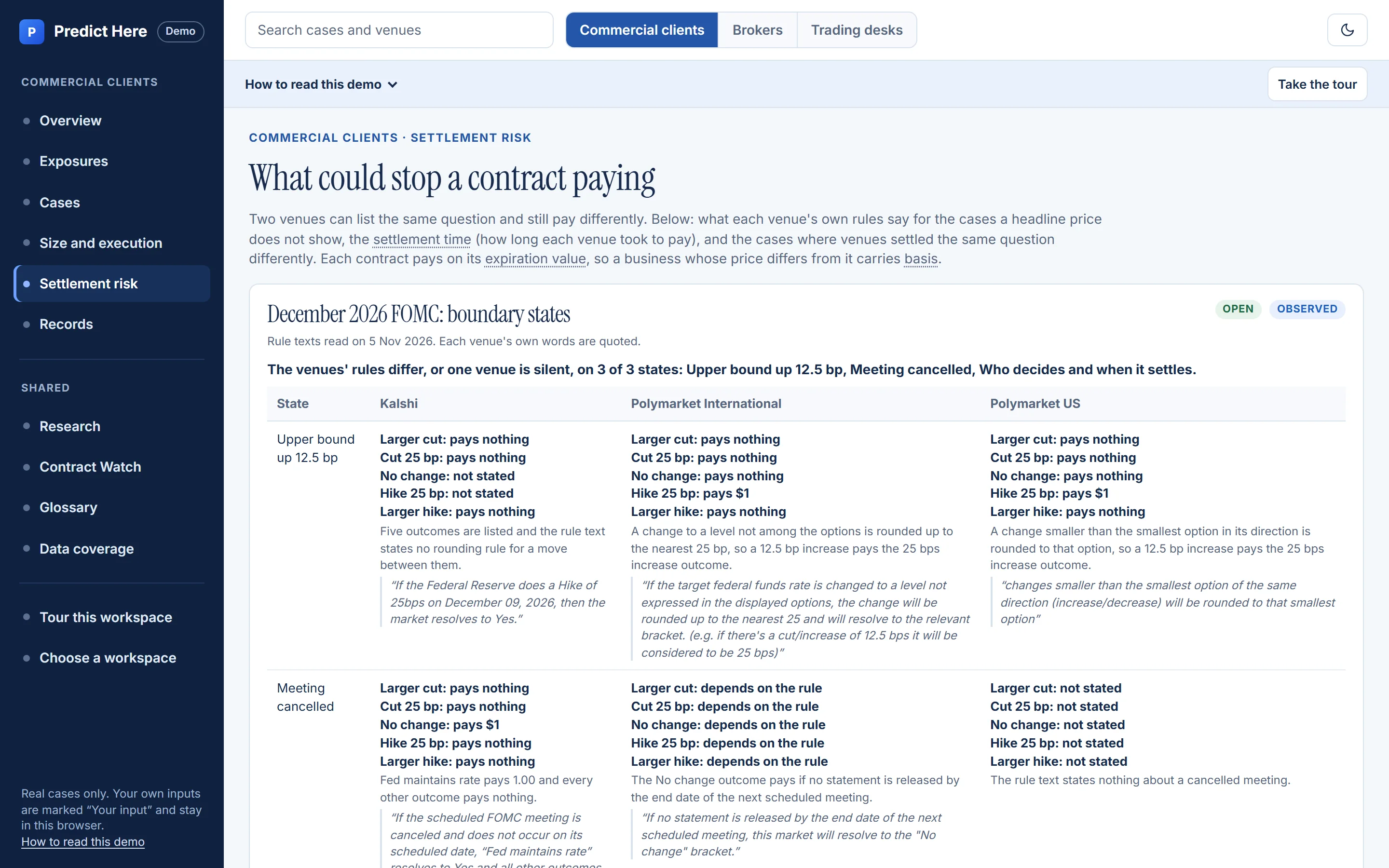
The Commercial clients Settlement risk view: for states a headline price does not show, what each outcome pays on Kalshi, Polymarket International and Polymarket US, with each venue's rule text quoted.
What you get
The hedging review and Settlement risk are in the public demo and need no account. The table lists what an organization workspace adds, with the current status of each.
Capability status describes what is implemented. Venue rows: Live means Predict Here read that venue's public market data and got an answer within the last five minutes. Otherwise the venue shows the stored-price collector's last run, refreshed every 5 minutes. They do not establish that data reaches your organization. Delivery and organization source rights are separate checks; a plan alone does not grant source access.
| Capability | Status | Explore | Delivery |
|---|---|---|---|
| Source, as-of time and quality state on every figure | Available | Limited | Event workstation |
| Rules-changed and confidence-change signals on your watchlist | Available | Evaluation required | Alerts |
| The same records programmatically, for a model or a report | Available | Evaluation required | Production API |
| Cross-source comparison only when rights and a reviewed mapping permit it | Built; availability conditional | — | Not delivered today |
Settlement risk
Check what each venue's rules pay in states a headline price does not show, such as a move between listed outcomes or a cancelled meeting, and how long each venue has taken to settle.
These are readings of published rules, with each venue's own text beside them. They are not market probabilities and not advice.
Explore the public Demo
Start a hedging review, keep your saved work, and read what could stop an event contract paying.
- Hedging review: a four-step review of your own exposure
- Saved work: drafts and reviews saved in this browser
- Settlement risk: what each venue's rules pay
- Market records: sourced records from three venues
Fields start empty and nothing is pre-filled. Exchange futures and options prices read “License pending”. No exchange price is shown. Anything you type stays in this browser.
Open cases read live venue prices for display only. Settled cases keep their recorded prices. Neither is a quote or an offer to trade.
Your evaluation
Agree the scope and any evaluation costs before work begins. Assess the research on your event set before deciding on ongoing access.
Request evaluation
Tell us your role and your event set. We aim to reply within one business day.Scoping call
Thirty minutes on the events you actually cover and what a useful answer looks like.Institutional Evaluation
Assess the agreed research output against your event set, with source permissions and evaluation terms in view, before deciding on ongoing access.
Demo
Try it in the demo
Three workspaces for commercial clients, brokers and trading desks: a hedging review of your own exposure, and real market records from Kalshi, Polymarket International and Polymarket US. No account needed, and your inputs stay in this browser.
See it on your own exposure
Open the demo to start a hedging review with your own figures, or request an evaluation to discuss an organization workspace.